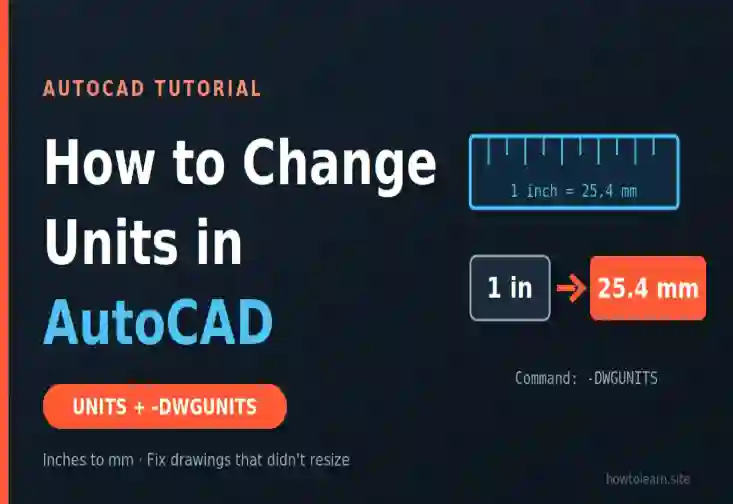
How to Change Units in AutoCAD
Learn how to change units in AutoCAD with UNITS, -DWGUNITS and DIMSTYLE, plus scale factors and fixes for drawings that didn't resize....
You have a project in your head. Maybe it’s a robot that follows you around the room, a camera that spots defects on a factory line, or a local chatbot that never touches the cloud. You open NVIDIA’s Jetson page, and suddenly there are Nano, Orin Nano, Orin NX, AGX Orin, Thor, and a pile of numbers that all look important.
Then you check the price and it’s higher than it was two months ago. Welcome to Jetson shopping in 2026.
Take a breath. Learning how to choose a Jetson module is much less scary once you know which three or four numbers actually matter, and which famous ones (cough, TOPS) you can mostly ignore. Let me walk you through it the way an older colleague would, mistakes included.
Short Answer: How do you choose a Jetson module? Pick by memory first, then power budget, then I/O (cameras and networking), then software support and price. For most people: Orin Nano 8GB for learning and single-camera vision, Orin NX 16GB for multi-camera robots and small vision-language models, AGX Orin 64GB or Thor T4000 when you need lots of memory, and Thor T5000 for humanoids and large generative AI. Skip Xavier, TX2 and the old Nano for new designs.
That’s the quick version. The details are where people lose money, so let’s go through them properly.
Here’s the thing. The Jetson lineup changed a lot in the past year, and many guides haven’t kept up:
So a guide that still calls Thor “coming soon” is out of date, and so is any budget you built on last spring’s prices. We’ll use current numbers here.
Before the specs, decide what you’re actually buying.
A developer kit is a Jetson module already mounted on a reference carrier board with ports, power and cooling. It’s meant for prototyping, learning and software development. A production module is the bare compute module you design into your own product with a carrier board.
Two things trip people up here:
My advice: prototype on a dev kit, then pick a production module once you’ve measured your real workload. That leads to the most important idea in this guide.
Jetson modules use unified memory, meaning the CPU and GPU share one pool. Your operating system, your camera pipeline, ROS, your model and everything else all draw from the same bucket.
That’s why memory capacity is the first filter:
One lesson from the community: a model can “fit” and still be a bad deployment. Developers warn against giving all the memory to an LLM, because longer prompts, longer outputs and your other running processes all need headroom.
Memory bandwidth matters too. Here is where each family sits:
| Family | Memory | Bandwidth |
|---|---|---|
| Orin Nano | 4GB / 8GB | 51 / 102 GB/s |
| Orin NX | 8GB / 16GB | 102 GB/s |
| AGX Orin | 32GB / 64GB | 205 GB/s |
| Thor T4000 / T5000 | 64GB / 128GB | 273 GB/s |
For workloads that are limited by memory bandwidth rather than raw compute (which includes much of LLM text generation), bandwidth is a better guide than headline TOPS.
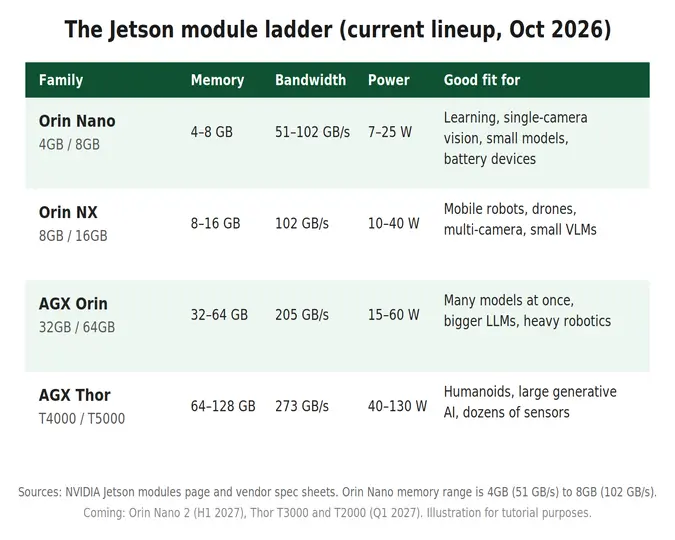
Every spec sheet leads with performance, and this is where people get misled.
So use TOPS to place a module in a tier, then benchmark your own model on a dev kit. It’s the only number that never lies.
Power is where hobby projects meet reality, especially if you’re building a drone or a battery robot.
Two practical warnings:
A community rule of thumb from robotics discussions: AGX is too heavy for drones, while Orin NX suits mobile robots.
Compute isn’t useful if you can’t get sensor data into it. Before you buy, list every camera, network link and storage device you need.
The module sets the ceiling, and the carrier board decides what you can actually use. A few useful facts:
If you only need one or two cameras, you’re probably in Orin Nano or Orin NX territory.
Hardware choice and software choice are tied together on Jetson, and this is the step most guides skip.
Some real-world friction to expect:
So ask yourself whether your existing code and containers are tied to JetPack 6, and budget migration time if you plan to move to 7.2.
Here are the 2026 prices after the July increase. Module prices are per unit at 1,000 or more units, so small buyers pay more.
| Product | New price |
|---|---|
| Orin Nano Super Developer Kit | $399 |
| Orin Nano 4GB module | $349 |
| Orin Nano 8GB module | $399 |
| Orin NX 8GB module | $649 |
| Orin NX 16GB module | $999 |
| AGX Orin 32GB module | $1,799 |
| AGX Orin 64GB module | $2,999 |
| Thor T4000 module | $2,999 |
| Thor T5000 module | $4,999 |
| AGX Orin Developer Kit | $3,499 |
| AGX Thor Developer Kit | $5,499 |
A few things stand out:
Fair question, since three new ones are coming.
My rule: if you need to ship or learn now, buy what’s available and keep your code portable. If you’re starting a product that won’t launch until mid-2027, it’s worth planning around the new parts. NVIDIA is also keeping Orin in the lineup for the lower half of the range.
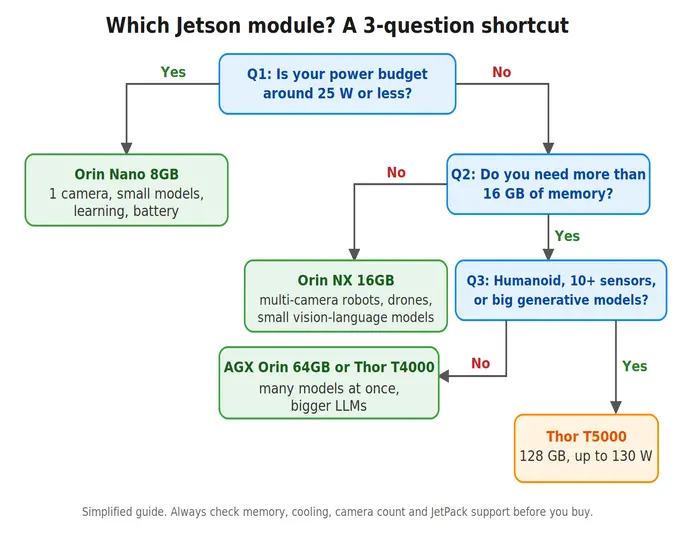
| Your project | Start with |
|---|---|
| Learning edge AI, first projects | Orin Nano Super Developer Kit |
| One-camera vision, battery-powered device | Orin Nano 8GB |
| Mobile robot or drone with several cameras | Orin NX 16GB |
| Small language or vision-language model on the device | Orin NX 16GB or Orin Nano 8GB (tight) |
| Many models at once, bigger LLMs | AGX Orin 64GB or Thor T4000 |
| Humanoid robot, large generative AI, many sensors | Thor T5000 |
| New design based on Xavier, TX2 or Nano | Don’t. Pick an Orin or Thor module |
Here are the ones I see most.
For more guidance, you can watch this video: How to choose a Jetson module video.
Q1: Which Jetson module should a beginner choose? The Orin Nano Super Developer Kit. It’s now $399 after the July 2026 price rise, but it’s the most widely supported entry point, with the biggest community behind it.
Q2: What’s the difference between Orin Nano and Orin NX? Orin NX has more memory (up to 16GB), higher memory bandwidth (102 GB/s), more GPU performance, and extra accelerators such as NVDLA and PVA, at a higher price and power draw. Orin Nano is the cheaper, lower-power entry module.
Q3: Can a Jetson Orin Nano run an LLM? Small, quantized models, yes. Ollama on Jetson officially lists Orin Nano 8GB, Orin NX 16GB and AGX Orin 32GB and 64GB. But leave memory headroom for your OS and other processes, and expect it to suit small models rather than large ones.
Q4: Should I buy a Jetson Xavier or the original Jetson Nano? Not for a new project. Several Xavier and TX2 modules are being phased out, with last shipments due by July 2027, and the older Nano platform has weaker support for newer frameworks.
Q5: Is Jetson Thor worth it over AGX Orin? If you need more than 64GB of memory, many sensors, or large generative models, yes. At the module level, T4000 now costs the same as AGX Orin 64GB, but it needs JetPack 7, a Thor carrier board and a 40 to 70 W budget.
Q6: Do I need a carrier board? Yes. The module is the compute core, and the carrier board provides power, ports, cameras and storage. Dev kits include a reference carrier board.
Q7: Should I wait for Orin Nano 2? Only if your project can wait until the first half of 2027 and you’re comfortable with unannounced pricing. If you need to start now, build on Orin Nano or NX and keep your code portable.
Learn how to change units in AutoCAD with UNITS, -DWGUNITS and DIMSTYLE, plus scale factors and fixes for drawings that didn't resize....
Learn how to rename a block in AutoCAD with the RENAME command, wildcards, and -RENAME, plus quick fixes when a block won't...
Learn how to delete blocks in AutoCAD the right way: erase every copy, then PURGE the definition. Plus fixes for blocks that...
Free, short and practical. No spam, unsubscribe anytime.
Thanks! You are on the list.